
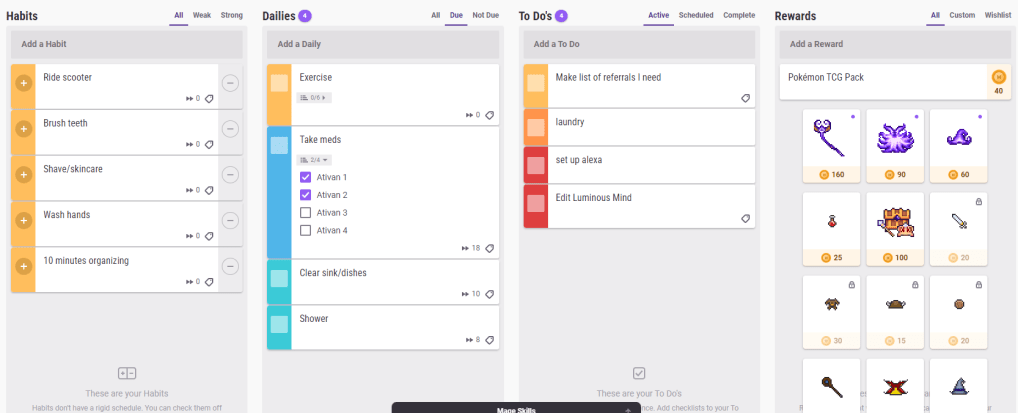
It seems like everyone’s got their own favorite app for managing daily tasks and to-dos, but so far my favorite is Habitica. I think it could be really useful for neurodivergent people with the right personality — Habitica is very much a “menus” game. If you love fine-tuning and deep personalization, Habitica could be perfect for you.
Habitica is available as both an app and a web interface. They both have utility, which I’ll discuss, and having both available may be great if you spend a lot of time at your desk. It is free with paid upgrades available; I haven’t paid for any upgrades and none of the features I’ll mention in my review are paid features. When you start playing (we are “playing” since Habitica is all about gamification, or turning your life’s to-do list into a game) you get a pixel avatar, which you can level up, equip items and pets to, and more. But the pixel avatar isn’t even the best feature of Habitica, in my opinion. You could play quite efficiently paying no attention to the avatar at all — more on this later.
Set habits, dailies, and to-dos all in one app
It’s possible to use two or even three different apps to track all of these kinds of tasks. A more precise definition:
Habits: Tasks you want to do regularly (or reduce doing — habits can be negative), but that don’t have a fixed schedule for their occurrence.
Dailies: Tasks you want to do at specific times, for example, every day, or every 3 days, or every Tuesday and Thursday.
To-dos: Tasks you need to do once.
Each task can have checklist items, which increase the value of the task. In fact, there’s a pretty crazy level of detail and precision that can be attained in the settings menu for each task. And the system can have a learning curve, but that in itself makes the system appealing for menus-type people.
Pause damage as you need it
For neurodivergent people, it’s important any app can be flexible to avoid overwhelming us. Habitica normally inflicts damage on your character for missing dailies — however, there is an option in the setting menu to pause damage. No damage will be inflicted on you until you turn damage back on again and there is no cost or downside to pausing damage. You can continue to get rewards as usual.
Custom rewards
Habitica comes with many built-in rewards, including items for your avatar, eggs and hatching potions (which create pets), and so on. But the primary currency of the game is gold, and you’re able to set custom rewards for in-game gold. I set up a Pokemon TCG pack for 40 gold. Any reward can be integrated into Habitica! Try using a preferred treat, video game time (or any favored activity), or small amounts of spending money as rewards.
Personalization of the app and the web interface
The Habitica app allows you to choose from an impressive number of color themes, sound themes, and even custom app icons. Meanwhile, the web interface allows you to see everything you have to do at once — and gives the option to toggle tasks that are not due today so that they are invisible.
The thoughtful design and customization features of Habitica are what make it the best app I’ve used. It can be overwhelming, though, for people intimidated by those features. But it’s free, so why not give it a try?
*I am not affiliated with Habitica.
 BipolarCoaster
One thought on “Neurodivergent App Review: Habitica”